
CoinSyncer: Your Crypto Portfolio Tracker for Web and Android
A crypto portfolio can become difficult to follow when your assets are spread across different places. You might hold Bitcoin in a personal wallet, keep some tokens on an exchange, and use several blockchain networks. Checking each account separately turns a simple question—“What do I currently hold?”—into a recurring task.
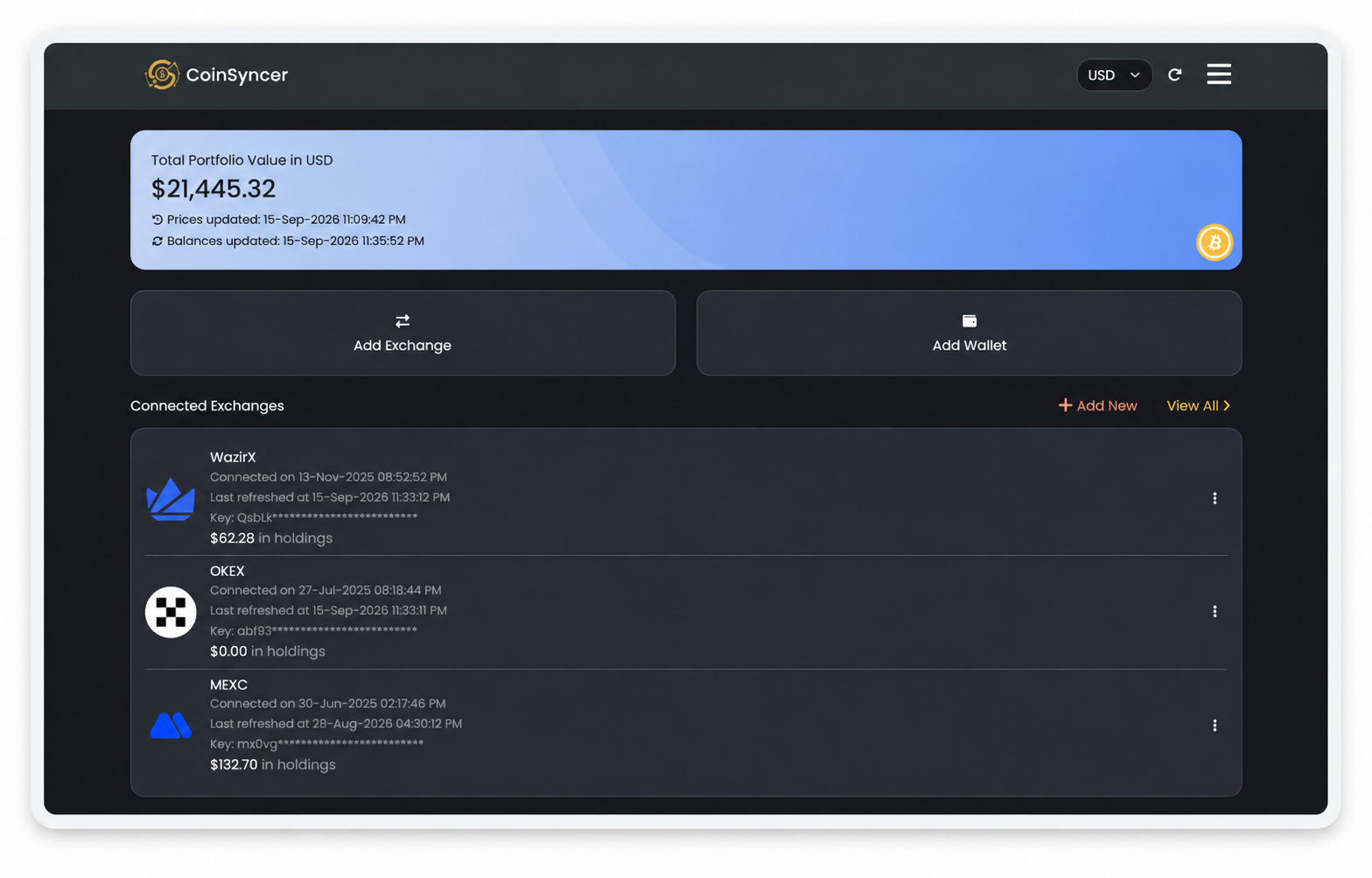
CoinSyncer brings those holdings together. It is a free crypto portfolio tracker that automatically synchronizes supported exchange accounts and wallet addresses, helping you monitor your cryptocurrency portfolio from a single dashboard. You can access it through a web browser or the CoinSyncer Android app.

What Does CoinSyncer Do?
CoinSyncer helps you understand your portfolio from three perspectives: what you own, where you hold it, and how much it is worth at the latest update. Instead of maintaining a separate view for every exchange and wallet, you can review connected accounts alongside your combined holdings.
The dashboard includes an overall portfolio value, connected exchanges and wallets, and a coin-holdings breakdown. This makes it useful for answering practical questions, such as which assets make up your portfolio and how your holdings are distributed across different locations.
How CoinSyncer Connects to Exchanges and Wallets
Exchange Tracking Through API Connections
For supported exchanges, CoinSyncer uses API credentials to retrieve account information. An API connection lets the tracker read the data needed to display your holdings without requiring you to enter your exchange login password into CoinSyncer.
The exchange connection process uses credentials generated in your exchange account. For example, CoinSyncer’s Binance connection screen asks for an API key and API secret and includes an acknowledgment of read-only access. These credentials are different from the password you use to sign in to Binance.
Wallet Tracking Through Public Addresses
For supported blockchain networks, you can add public wallet addresses for on-chain tracking. CoinSyncer uses these addresses to retrieve supported holdings and include them in your portfolio overview. Exchange accounts and wallet addresses therefore become part of one tracking experience, rather than two separate sets of records.
Key CoinSyncer Features
Automatic Balance and Price Updates
CoinSyncer refreshes balances multiple times a day and updates cryptocurrency prices several times daily. After connecting your supported accounts, you do not need to re-enter holdings manually for every routine update.
These are periodic updates, not a continuous real-time market feed. CoinSyncer also offers notifications when balances and prices refresh, helping you know when updated information is available.
A Clear View of Your Portfolio
The dashboard brings together portfolio value, account locations, and individual holdings. Its coin-holdings chart provides a visual breakdown, while the asset table lets you examine the underlying coins and tokens.
You can use the overview for a quick check, then look more closely at particular holdings when you need additional detail. A visible breakdown is especially useful when you want to review your allocation rather than focus only on the portfolio’s total value.
Individual Asset and Location Breakdowns
Knowing that you own an asset is only part of the picture. You may also need to know which connected accounts hold it. CoinSyncer’s asset view shows total holdings and their value, alongside the locations contributing to that total.
This provides a practical way to inspect an asset held across more than one exchange without treating each account as an unrelated portfolio.
Daily Portfolio Snapshots
CoinSyncer records daily snapshots covering your total holdings, holdings by wallet or exchange, and holdings by individual asset. These snapshots add a historical perspective to your portfolio tracking, rather than limiting you to a single current balance.
A portfolio value comparison should still be interpreted carefully: a higher total after adding more funds does not, by itself, establish an investment gain.
Accurate Coin and Token Identification
Accurate coin identification is another part of CoinSyncer’s approach. The platform is designed to detect and categorize coins and tokens so that your holdings appear under the appropriate assets. This supports a clearer portfolio overview when you track a varied collection of cryptocurrencies.
Supported Blockchain Networks and Exchanges
CoinSyncer supports more than 90 blockchain networks and over 20 exchange integrations. Its Wallets and Exchanges page provides the current supported-platform list.
Listed networks include Bitcoin, Ethereum, Solana, Arbitrum One, Base, Polygon, Avalanche, Cardano, Sui, and Radix. Listed exchange integrations include Binance, KuCoin, Gate.io, MEXC, Coinbase, Kraken, Bybit, Bitget, and BitMart.
Check that list when planning which accounts to connect. It is a better reference for integration coverage than assuming that every exchange, network, token, or account product is supported.
Use CoinSyncer in Your Web Browser
The CoinSyncer web app provides browser-based access to your portfolio. There is no desktop application to install just to use the browser interface.
Browser access is a convenient option when you want to review holdings on a larger screen or keep your portfolio available alongside your usual research and account-management tabs. You can start from the CoinSyncer website and choose the Web option, or open the web app directly.
Use the CoinSyncer Android App
For mobile access, install CoinSyncer: Crypto Tracker on Google Play, published by Rhyzz. The Android app provides another way to follow your connected exchange accounts, wallet balances, and portfolio overview.
Use the browser interface for a longer portfolio review and the Android app for a convenient check from your phone. Both are access options for CoinSyncer, so you can choose the experience that fits your routine.
Read-Only Tracking, Not Control of Your Funds
CoinSyncer is built for monitoring holdings. Its privacy policy describes exchange and wallet data retrieval as read-only and states that it does not collect or store private keys or exchange passwords.
Connecting an account for tracking is not a deposit into CoinSyncer. Your assets remain in their existing wallets or exchange accounts. When setting up an exchange integration, use read-only permissions rather than granting trading or withdrawal access.
Read-only access describes what a connection is permitted to do; it should not be confused with a promise of anonymous usage. Review the privacy policy and the Android listing’s data-safety information to understand the service’s disclosures.
How to Get Started with CoinSyncer
- Choose your access method. Open the web app or install the Android app from Google Play, then sign in.
- Add your supported accounts. Use Add Exchange to connect an exchange through its required API credentials, or Add Wallet to enter a public address for a supported network.
- Review your portfolio. Once balances have synchronized, check your overall value, connected accounts, and individual holdings. Pay attention to the displayed update times when reviewing the figures.
For an integration that is not available, use the Requests section in the app to suggest a network or exchange. You can also contact CoinSyncer through the website.
Who Is CoinSyncer For?
CoinSyncer is particularly relevant to people who want a straightforward view of holdings spread across supported wallets and exchanges. That might mean a long-term holder checking several wallet addresses or someone who uses different exchanges for different assets.
Consider a simple portfolio review: you want to know your combined holdings, identify where a particular asset sits, and see how much of your portfolio it represents. Keeping those questions together is more useful than opening each account solely to copy its balance into a spreadsheet.
From FusedFolio to CoinSyncer
CoinSyncer is the successor to FusedFolio. The FusedFolio rebrand announcement explains the transition to CoinSyncer, with the older website retained as an archive and new development and support directed to CoinSyncer.
Bring Your Crypto Portfolio into One View
Portfolio tracking should help you understand your holdings, not create another collection of records to maintain. Start by connecting the supported accounts you use, then make a habit of reviewing both the overall picture and the locations behind it.
Open the CoinSyncer web app or install CoinSyncer for Android to get started.